Homes And Rentals
- 4.8
- Rating
- 500.00K
- Installs
- Free
- Price

 Analysis by App-foxy
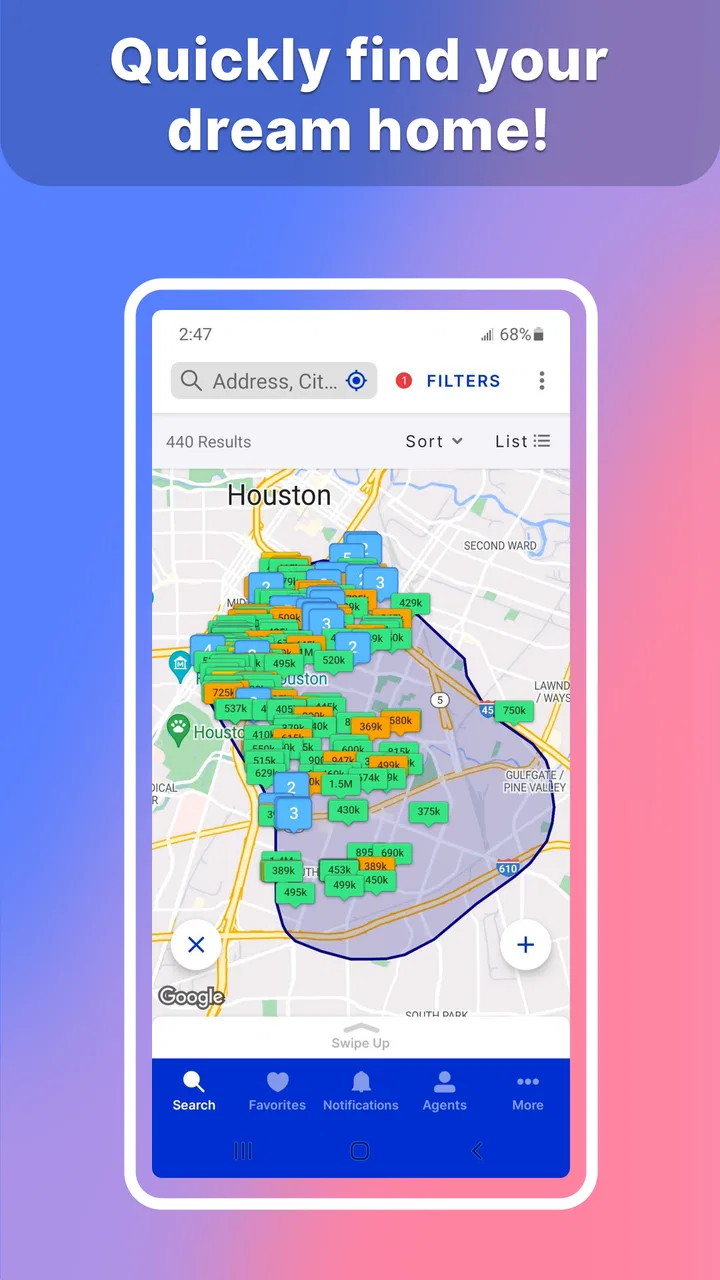
Finding a home on a phone sounds simple until you are trying to compare several neighborhoods, check a rental during a lunch break, or decide whether a new listing is worth a viewing before someone else gets there. My experience with Homes And Rentals is that its value depends heavily on how well your phone can reach current listing information. It is not merely a collection of saved property notes; it is a mobile window into MLS information connected with the Houston Association of REALTORS®, the developer behind the app.
That connection is both the app’s main strength and the first thing I would keep in mind before relying on it. When the network is responsive, browsing feels practical because the information is intended to stay current. When reception is weak, the experience becomes less dependable, especially if you are trying to make a quick decision. I would recommend it most to people actively searching for homes or rentals in the Houston-area market who want a focused mobile starting point rather than a general-purpose real-estate website.
How Homes And Rentals feels when the network is doing the work
The central experience is straightforward: open the app, browse available homes or rentals, and use the current MLS connection to narrow your search. The store summary describes HAR.com as connecting consumers and REALTORS® with up-to-date MLS data, and that explains why connectivity matters so much here. The app’s usefulness is tied to seeing information that can change, not simply reading a fixed guide to buying or renting.
You May Also Like

 Blood Strike: 2.5 Anniversary
Blood Strike’s Loadouts Turn Every Drop Into a Tactical Gamble
A close look at Blood Strike’s custom loadouts: how fast access to signature weapons reshapes its battle royale rhythm, rewards preparation, and narrows the gap between fights.

 Pandora - Music & Podcasts
Pandora’s Music Is Easy to Start, but Harder to Recover
Pandora’s strength is its low-effort path from a seed to a station. Its weak spot is how much confidence it asks you to place in connection, setup, and quiet recovery.

 8 Ball Pool
 Is Built on Rivalries, Rematches, and Routine
A close look at the rivalries, rematches, shared routines, and unanswered safety questions that turn a quick pool match into a persistent mobile community.

 Samsung Music
’s Quiet Strength Is Playing What You Already Own
Its reach comes less from spectacle than from dependable access to a personal library. That simplicity is both the app’s strongest retention engine and its ceiling.

 AccuWeather: Weather Radar
AccuWeather Review: A Quick, Clear Forecast for Everyday Decisions
For everyday plans, the best forecast is the one you can understand quickly. AccuWeather makes rain timing, radar, and local conditions easy to act on, with a few trade-offs.

 Hill Climb Racing
Why Hill Climb Racing Still Turns Crashes Into One More Run
A tiny car, a bumpy hill and one more upgrade: Hill Climb Racing keeps resurfacing because its simple chaos makes every near-miss feel personal.
More From Our News Desk



In a strong signal area, I find this approach more useful than keeping several browser tabs open. A dedicated app puts the property search in a more direct mobile context, which is helpful when I am checking listings while moving between neighborhoods. It also makes the search feel more purposeful than scrolling through broad housing content that may mix markets or include homes outside the area I actually care about.
There is a practical trade-off, though. A current listing feed is valuable precisely because homes can change status, disappear, or receive new information. That means I would not treat a screen I saw earlier as a permanent record of availability. If a property matters, I would check it again before arranging a viewing or making plans. The app can help me discover and compare possibilities, but it should not replace direct confirmation when timing is important.
For a realistic example, imagine leaving work and wanting to inspect rental options close to a possible new commute. With a reliable connection, I can use the app to review homes while sitting in a parking lot or waiting for an appointment, then decide which addresses deserve further attention. The useful part is not just convenience; it is reducing the gap between noticing a property and acting on that information.
That same scenario shows why I would avoid making a final decision from one quick glance. Mobile browsing encourages fast judgments, while a home involves details that deserve slower checking. I use the app to build a shortlist, compare the practical fit of different properties, and identify questions for a REALTOR® or property contact. I do not use it as proof that every detail will remain unchanged by the time I arrive.
What the mobile setting does particularly well
The app belongs to the House & Home category, but I see it less as a general household utility and more as a focused property-search tool. Its free price makes it easy to try without committing money before knowing whether its coverage and workflow suit you. The Everyone content rating also makes it approachable for a broad audience, including people beginning their first serious search.
Its strongest audience is someone who wants a direct route to homes and rentals rather than a large collection of unrelated real-estate articles. I can imagine using it during a neighborhood drive, before a scheduled viewing, or in the early stage of deciding whether moving is financially and practically realistic. Because the experience is mobile, I can revisit a shortlist in the places where housing decisions actually happen: at work, on public transport, outside a property, or at home with a partner.
A useful habit is to separate discovery from verification. During discovery, I look for location, general suitability, and properties worth investigating. During verification, I revisit the listing with a stable connection, check the details carefully, and contact the appropriate professional if something affects my decision. This two-step workflow prevents the speed of the app from turning into overconfidence.
Weak reception, interruptions, and recovering without losing the thread
The biggest friction is predictable for a connectivity-focused app: a poor signal can interrupt the very information I opened the app to see. A basement, crowded building, rural road, underground car park, or overloaded public network can make property browsing slower or less comfortable. I would not assume that a listing I viewed earlier will remain available for reference when I lose reception, because the product’s core purpose is connected access to current information rather than guaranteed offline browsing.
My practical response is to prepare before entering a weak-signal situation. If I am heading to view a property, I review the relevant information while I still have a dependable connection and write down the address or other essential details I need for the appointment. I also avoid closing the app immediately after finding something important until I have noted what I need. This is not a criticism unique to one screen; it is a sensible precaution whenever a service depends on live property information.
If the app stops responding, I would first check whether the phone has a usable connection rather than assuming the listing itself has vanished. Moving to a place with better reception, switching from an unstable public network to mobile data, or reopening the app can distinguish a temporary network problem from a genuine change in availability. I would then search again instead of relying on an old result.
That recovery process is especially important when browsing several homes in one outing. I would keep a simple shortlist outside the app, with the addresses and the reason each property interested me. The point is not to duplicate the entire listing. It is to preserve the decision trail if connectivity fails between stops. This small habit makes the app more useful in real life because it protects the planning around the search, not just the moment of browsing.
I also think the app is less suitable for anyone who expects a complete property reference library that remains equally useful without a connection. If your routine takes you through places with unreliable service and you need every listing detail available at all times, a connected MLS browsing tool may feel limiting. In that case, a saved document supplied by a REALTOR® or a separately arranged offline plan may be a better companion, although I would still use current information before acting.
Using it carefully on mobile data
Because housing searches can involve repeated browsing, I would be mindful of how I use the app away from Wi-Fi. I do not need to refresh the same property again and again while making a decision. Instead, I review a group of likely matches, remove the obvious mismatches, and then return to the smaller shortlist. This is more efficient for my attention and may also reduce unnecessary network activity.
Another sensible approach is to avoid treating every new listing as equally urgent. I first define the essentials that matter to me, such as area, rental or purchase purpose, and whether the property appears realistic for my situation. Only then do I spend time examining individual results. This prevents a long, unfocused browsing session in which I repeatedly load homes that were never serious candidates.
When I am using mobile data in a hurry, I focus on the information needed for the next action: whether the home is worth investigating, whether the location works, and whether I should contact someone. I save deeper comparisons for a more stable connection and a quieter moment. That workflow is particularly useful when a listing catches my eye while I am away from home but I do not yet need to make an immediate decision.
I would also be careful with public Wi-Fi when viewing personal search activity or discussing a property. The app is designed for housing research, but the network around it still affects the overall experience. I prefer a connection I trust, especially if I am moving from browsing into a conversation with a REALTOR® or entering information elsewhere on my phone.
Who will get the most from it, and who may prefer another route
Homes And Rentals is a strong fit for people who want a focused way to explore Houston-area homes and rentals through MLS-connected information. It is also useful for renters who are still learning which neighborhoods fit their daily routine. I like that the same basic tool can support an early browsing session, a shortlist before viewings, and quick checking while moving around town.
It is less compelling for someone who is not searching in the market it serves, or for a user who wants a broad national comparison across many unrelated regions. A general real-estate marketplace may be more convenient for cross-country research, while a REALTOR®’s direct communication may be better when the search has already narrowed to a few specific properties. The choice depends on whether I need discovery or personal guidance at that moment.
I would also skip making it my only tool if I need sophisticated long-term organization. The app is best at helping me see and investigate property opportunities. For a complicated move involving multiple decision-makers, I would pair it with notes, a budget worksheet, calendar reminders, and direct conversations. That is not a failure of the app; it is the difference between a search window and a complete relocation system.
Its established presence is reassuring to me. The app was released in September 2011, and the current version is 4.2.14, with support beginning from Android 7.0. It has passed the threshold of over 500 thousand installs, carries an average rating of 4.8 from around 7 thousand ratings, and has about 1.6 thousand written reviews. Those figures suggest that many people have found the service useful, but I still judge it by whether its connected listing workflow matches my own search habits.
My verdict on the connected search experience
I recommend Homes And Rentals when the goal is to browse homes and rentals through a Houston-focused MLS connection while moving through everyday life. Its best moments happen when I have a reliable signal, a clear shortlist, and a specific next step. The app turns spare minutes into useful search time and gives me a more direct alternative to repeatedly navigating a general website.
The important limitation is that connectivity is not a minor detail here; it shapes the product. Weak reception can disrupt browsing, and current listing information should be checked again before I rely on it for a viewing or a serious decision. I would prepare key details before entering a poor-signal area, use mobile data selectively, and keep a lightweight external shortlist for recovery.
For a free House & Home app from the Houston Association of REALTORS®, I think the balance is favorable for the right audience. It is not a replacement for professional advice, personal budgeting, or careful property verification. It is a practical connected starting point that helps me discover possibilities, compare them on the go, and decide which ones deserve a closer look. If that is what you need, I would install it and give it a real search rather than judging it from the brief store summary alone.
FAQs for Homes And Rentals
01What platforms is Homes And Rentals available on?
Homes And Rentals is available on both Android and iOS platforms. Users can download the app from the Google Play Store for Android devices and the Apple App Store for iOS devices. This ensures a wide accessibility for users across different smartphones and tablets.
02Is there a cost associated with using Homes And Rentals?
Homes And Rentals is free to download and use for basic features. However, there might be premium features or additional services that require in-app purchases or subscriptions. It's advisable to check the app's pricing details within the app store or on the app's website for accurate information.
03What features does Homes And Rentals offer to users?
The app offers a comprehensive range of features, including advanced search filters, detailed property listings, virtual tours, and user reviews. Additionally, it provides options to save favorite properties, set up alerts, and connect directly with real estate agents, making the home search process efficient and user-friendly.
04How secure is my personal information on Homes And Rentals?
Homes And Rentals prioritizes user privacy and employs robust security measures, including encryption, to protect personal data. Users are encouraged to review the app’s privacy policy for detailed information on data handling practices and to ensure their information is handled securely.
05Can I use Homes And Rentals without an internet connection?
Homes And Rentals requires an internet connection to access the latest property listings and updates. Some features, like viewing previously saved properties, may be available offline, but for a complete experience, including real-time updates and communications, an active internet connection is necessary.
Pros
- User-friendly interface for easy navigation.
- Comprehensive property listings and filters.
- Detailed property descriptions and images.
- Includes a mortgage calculator tool.
- Real-time notifications on new listings.
Cons
- Limited customer support options available.
- Some areas have fewer property listings.
- Occasional app crashes during searches.
- Requires a constant internet connection.
- In-app ads can be intrusive at times.

Homes And Rentals
Gallery